Search News
TerraVista Metrics (TVM)Industry Portal
TerraVista Metrics (TVM)Hot Articles
TerraVista Metrics (TVM)- Choosing an Amusement Equipment Testing Agency: Accreditation and ScopeChoosing an amusement equipment testing agency? Learn how to verify accreditation, assess technical scope, and compare reports before you commit.
- Global Temporary Buildings Market Forecast to Reach $5.88 Billion by 2032Global temporary buildings market is forecast to reach $5.88 billion by 2032. Explore the modular, reusable and rapid-assembly trends driving growth.
- Product Benchmarking: How to Compare Material Performance and DurabilityMaster product benchmarking and material comparison with practical tips for evaluating test data, durability and lifecycle costs. Make confident purchasing decisions.
Popular Tags
TerraVista Metrics (TVM)Industry NewsKeeping Hotel Information Kiosks Accurate When Guest Services Change
auth.Lydia Vancini (Smart Hospitality IoT Consultant)Time
Nov 07, 2026Click Count
A breakfast time changes, the spa closes for maintenance, or the airport shuttle moves to another entrance. If the hotel information kiosk still shows the old details, guests follow instructions that no longer work—and the front desk has to resolve the confusion.
Keeping kiosk content accurate requires three things: an agreed source for each service detail, a clear process for publishing changes, and confirmation that the revised information actually appears on every affected screen. Saving an edit in a dashboard is only part of the job. The update is complete when guests can see the correct information wherever they encounter that service.
Find where outdated information enters the process
Before replacing software or increasing the frequency of checks, trace one recent error. Was the change never reported? Did someone edit the wrong property’s page? Was the update published while a kiosk remained offline? Each failure needs a different response.
Follow the information from the department that provides the service to the screen that displays it. For breakfast, that might mean food and beverage confirms the hours, a designated editor updates the content management system, and the front desk checks the lobby kiosk. If the information passed through an informal message without a clear recipient, the weak point is the handoff.
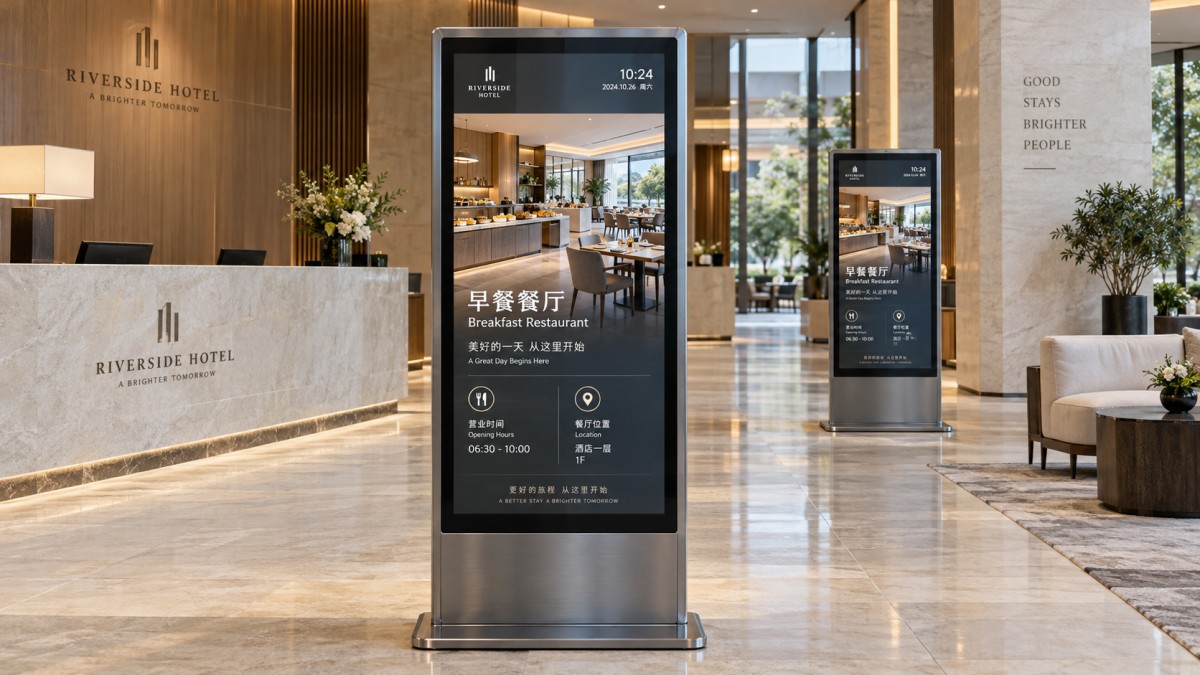
Also look for duplicate content. Breakfast hours may appear on a dining page, a home-screen tile, an event notice, and a restaurant image containing embedded text. Correcting one page leaves the other versions untouched. A useful content inventory records where each changeable fact appears, including linked menus, maps, and QR-code destinations.
This initial review should focus on details that influence guest decisions: opening hours, service availability, pickup locations, reservation requirements, charges, and access routes. Decorative descriptions can wait when guests are being sent to a closed facility.
Give each service an owner and a usable content record
The person who knows a service has changed may not be the person who can publish it. Both responsibilities need to be explicit. A spa manager can confirm a closure, while a duty manager or authorized editor updates the kiosk. Include a backup so the process still works during leave, overnight shifts, and busy arrival periods.
Maintain one agreed record for each service. A shared register may be sufficient for a small property; a structured content management system is more practical when several departments or hotels contribute updates. The important feature is that everyone knows which record governs the displayed information.
For frequently changing services, capture:
- The current guest-facing details: hours, location, availability, booking instructions, and relevant conditions.
- The service owner and publishing contact: who confirms the facts and who changes the display.
- The effective period: when the change begins and when it needs review or removal.
- The affected destinations: properties, screens, languages, maps, and linked pages.
- The verification record: who checked the published result and whether any screens remain unresolved.
A “last edited” date is useful, but it does not prove that the service details remain correct. Separate the date someone changed the wording from the date the responsible department confirmed the facts.
Use structured fields for recurring details where possible. Keeping opening hours in one reusable field reduces the need to rewrite them across multiple pages. Free text still has a place for unusual situations, such as a temporary entrance, but repeated facts should come from the same maintained record.
Make the update request specific enough to publish
“Please update the shuttle information” leaves too much interpretation to the editor. A useful request states what changes, when it changes, where it applies, and what guests should do.
For example, a shuttle relocation request could specify: “Airport shuttle pickup moves to the east entrance from tomorrow morning until the driveway work is complete. Departure times remain the same. Guests should wait beside the transport sign.” The service owner should also identify the next review point if the end date is unknown.
Keep the publishing workflow short enough to use during operations:
- Confirm the facts. Obtain the details from the department responsible for delivering the service.
- Locate every affected item. Include navigation pages, promotional tiles, translations, maps, and linked content.
- Preview and publish. Check the wording, property scope, effective time, and guest instructions.
- Verify delivery. Open the updated content on the affected kiosks and record any exceptions.
Routine changes can follow the normal approval process. An unexpected closure needs a faster route, with an authorized person able to publish a brief notice while fuller details are prepared. Additional approval stages are useful only when they prevent a meaningful error; excessive handoffs can leave incorrect information visible for longer.
Include outstanding updates in shift handovers. “Published, awaiting verification on the conference-floor kiosk” is actionable. “Kiosk updated” conceals an unfinished task.

Handle temporary changes without making promises you cannot keep
Temporary notices need a lifecycle. Otherwise, a maintenance message can remain visible after reopening, or disappear automatically while the facility is still closed.
Use scheduled start and end times when the operating period is confirmed, such as special breakfast hours for a planned event. Check that scheduling uses the property’s local time, particularly when a central team manages hotels in different time zones.
An uncertain reopening needs a different approach. Set a review reminder and keep the closure status active until the service owner confirms that operations have resumed. An expiry setting should not silently restore “open” simply because an estimated repair window has passed.
Write notices around the guest’s next action. “Spa unavailable” explains the status but leaves practical questions unanswered. A more useful message identifies the affected service, any available alternative, and how existing appointments will be handled. Include a reopening time only when it is confirmed.
Be precise about partial closures. If treatments continue while the sauna is closed, a notice saying “Spa closed” unnecessarily turns guests away. Similarly, revised restaurant hours may apply to dinner service without affecting breakfast.
For changes affecting immediate movement, make the notice visible along the relevant guest journey. A shuttle relocation belongs on the transport page and wherever guests normally look for departure information. A small banner on the home screen may disappear before someone notices it.
Check the guest-facing screen, not just the dashboard
A successful publishing message usually confirms an action within the management system. Depending on the setup, the kiosk may still need to download the update, refresh its browser, or replace locally stored content. A device can also remain connected while displaying an older page.
Verify the result through the same route a guest would use. Start at the home screen, select the service, follow its directions, and open any associated link or QR code. This catches inconsistencies that a preview cannot reveal.
For an important change, check:
- Whether the correct notice appears on each affected device or screen group.
- Whether old details remain in another page, image, map, or promotion.
- Whether dates, times, and property names display correctly.
- Whether translated versions convey the same operational instructions.
- Whether buttons and QR codes lead to current information.
Use remote screenshots or content-version reports when the system provides them, but understand what they show. A screenshot may confirm visible wording; a delivery record may only confirm that a device received a package. On-site checks remain useful for touch navigation, readability, and physical directions.
If a screen remains outdated, compare it with another device using the same content. Check its connection, assigned property or screen group, publication schedule, and application refresh status. Record unresolved devices so they remain visible in the handover rather than disappearing into a general “done” status.
Decide what guests should see when updates cannot arrive
Offline content keeps an information kiosk useful during a connection failure, but its suitability depends on how quickly the underlying facts change. A property overview may remain helpful. A shuttle disruption notice or current facility status can become misleading much sooner.
Choose fallback behavior according to the consequence of being wrong. For time-sensitive services, the fallback might direct guests to a staffed contact point when current status cannot be retrieved. Avoid displaying a confident availability claim simply because it was the last stored value.
If the system cannot distinguish fresh content from old content, establish an operational response. During an outage, staff may need to place a temporary notice at the affected kiosk or remove access to the outdated service page. The fallback must remain usable: guests need a working contact route or clear physical directions.
Test what happens after connectivity returns. Some systems retrieve changes automatically; others depend on refresh intervals or application behavior. Recovery is complete only when the latest service details have replaced the cached version.
Keep languages and connected systems aligned
A correction in the default language can leave other guests reading yesterday’s instructions. Treat translations as part of the same update, with a visible status for each supported language. Urgent notices benefit from preapproved wording for common closures, relocations, and booking changes.
Review meaning as well as wording. Translated notices must preserve dates, entrances, booking conditions, and the distinction between a partial closure and a complete closure. Keep essential instructions in text rather than relying on text embedded in images, which is harder to maintain consistently.
Connections to booking tools, property systems, or other hotel platforms can reduce duplicate entry, but each connection needs a clear purpose. A reservation system might show appointment availability without knowing that the access route has changed. Identify which source governs each field and which details still require departmental input.
Define how manual exceptions interact with automated updates. A confirmed emergency closure should remain visible even if a routine import contains normal opening hours. Without an override rule, the next synchronization can undo the correction.
Assess the workflow before buying more technology
A single hotel with occasional changes may manage well with a shared service register, controlled editing access, and dependable screen checks. A larger estate may need property-specific permissions, reusable content fields, scheduled publishing, translation tracking, and device monitoring.
Evaluate these capabilities through a realistic demonstration. Ask a supplier to change one service’s hours, apply a temporary closure, update a second language, and show what happens when one kiosk is offline. Then inspect the change history and recovery behavior. This reveals more operational value than a polished display alone.
TerraVista Metrics’ focus on smart hotel system benchmarking is relevant to this distinction: operators need evidence about interoperability and reliable operation alongside interface quality. For kiosk content, useful evidence includes how changes reach devices, how failures become visible, and how staff resolve them.
Begin with one service that changes frequently. Map its content, assign responsibility, and run its next update through publication and screen verification. If the process still depends on someone remembering an informal message, improve that handoff before expanding automation. The practical goal is a repeatable routine that keeps working when services change and the lobby is busy.
Recommended News
 Oct 24, 2026Using a Concierge Kiosk to Offer Multilingual Local RecommendationsUse a concierge kiosk to deliver multilingual local recommendations guests can trust. Discover practical tips for accurate listings, smart filters, and seamless QR directions.
 Oct 24, 2026Choosing a Hotel Kiosk Display: Brightness, Touch Accuracy, and DurabilityChoose the right hotel kiosk display with expert guidance on brightness, touch accuracy, and durability. Discover what to test to improve guest experiences and reduce maintenance costs.
 Oct 23, 2026Keeping Hotel Information Kiosks Accurate When Guest Services ChangeKeep hotels information kiosk content accurate as services change. Discover practical workflows, screen checks, and multilingual tips to reduce confusion and improve guest service.
 Oct 23, 2026Self-Service Kiosks vs. Staffed Check-In: Which Fits Your Hotel?Considering a kiosk in hospitality sector operations? Compare self-service and staffed hotel check-in, costs, integration, and guest experience to find the right fit for your property.
 Aug 04, 2026What Tourism Hardware Does a Visitor Center Need for Better Wayfinding and Service?Tourism hardware for visitor centers: discover the essential signs, kiosks, counters, and queue systems that improve wayfinding, service efficiency, accessibility, and visitor experience.
 Jul 14, 2026West Coast Port Strain Extends Kiosk Tech Sea Lead TimesWest Coast port strain is extending Kiosk Tech sea lead times to 48 days, raising PSS and delivery risk. See what exporters, buyers, and service teams must do now.
 Jul 12, 2026US West Coast Strike Extends Kiosk Tech Lead TimesUS West Coast Strike Extends Kiosk Tech Lead Times—learn how port disruption, Red Sea rerouting, and Mexico diversion are reshaping Q3 inventory, routing, and delivery planning.
 Jul 12, 2026How to Compare Cost Effective Slide Systems for Kiosks, Cabinets, and Compact EquipmentCost effective slide systems compared for kiosks, cabinets, and compact equipment. Learn how to evaluate load, cycle life, fit, and maintenance for smarter sourcing.
 Jul 10, 2026GCC Rule Adds Local Privacy Sandbox to Facial Recognition KiosksGCC rule updates put facial recognition kiosks under tighter compliance from July 10, 2026. Learn how local privacy sandbox firmware, GSO reports, and longer lead times affect GCC market access.
 Jul 09, 2026Singapore Tightens Kiosk Imports for Facial RecognitionSingapore Tightens Kiosk Imports for Facial Recognition: learn the new PSB rules, firmware SDK, and local data caching requirements before August 1, 2026.
 Jul 08, 2026ISPO Munich Adds Smart Wayfinding Pavilion as EU-US Interest Jumps 67%ISPO Munich spotlights smart wayfinding as EU-US interest jumps 67%. Explore AR navigation, multilingual kiosks, and offline maps shaping outdoor venue projects.
 Jul 07, 2026ISPO 2026 Kiosk Zone Signals New Buying RulesISPO 2026 Kiosk Zone signals new buying rules for smart wayfinding terminals, highlighting EN 301 549 compliance, localized CMS needs, and rising EU buyer demand.
![]() Jul 06, 2026ISPO Adds Kiosk Tech as China Draws Buyer InterestISPO adds Kiosk Tech as China draws buyer interest, signaling rising demand for IP65 outdoor kiosk terminals, offline OTA maps, and multilingual guidance solutions for parks, resorts, and ski areas.
 Jul 06, 2026Resort Self Check-In Kiosks: Best Use Cases, Guest Flow Risks, and Setup TipsResort self check in kiosks explained: discover the best use cases, common guest flow risks, and practical setup tips to reduce queues and improve resort arrivals.
 Jul 05, 2026ISPO Munich 2026 Adds Kiosk Tech Zone as Chinese Outdoor Terminals Draw OrdersISPO Munich 2026 spotlights kiosk tech as Chinese outdoor terminals win 1,240 orders. Explore how smart wayfinding, AR navigation, and solar-powered kiosks are reshaping parks and resorts.
 Jul 04, 2026ISPO Opens Kiosk Tech Zone as China Devices Draw BuyersISPO Opens Kiosk Tech Zone as China devices draw buyers, highlighting demand for smart guide terminals with offline maps, AR, and LoRaWAN/NB-IoT—see what suppliers and buyers should prepare now.
 Jul 03, 2026ISPO Munich 2026 Debuts Kiosk Tech ZoneISPO Munich 2026 debuts Kiosk Tech Zone, spotlighting smart wayfinding kiosks for ski resorts. Explore buyer demand for IP65+, -30°C performance, AR navigation, and offline maps.
 Jul 02, 2026ISPO Adds Kiosk Tech Zone as China Suppliers Draw OrdersISPO adds Kiosk Tech Zone as China suppliers win orders for smart wayfinding kiosks. Explore how IP66, solar charging, offline maps, and rising MOQs are reshaping procurement.
 Jul 01, 2026ISPO Munich 2026 Adds Kiosk Tech as Chinese Guide Terminals Draw BuyersISPO Munich 2026 spotlights Kiosk Tech as Chinese guide terminals attract buyers with multilingual AR navigation and offline maps. Explore the 210% order surge, delivery timelines, and GDPR-ready deployment trends.
 Jul 01, 2026Kiosk Technology for Guest Services: Which Features Improve Check-In and Self-ServiceKiosk technology for guest services: discover which features improve check-in, self-service speed, system integration, and guest satisfaction across hotels, resorts, and attractions.
 Jun 30, 2026SASO Opens 72-Hour Fast Track for Kiosk TechSASO Opens 72-Hour Fast Track for Kiosk Tech: learn how Saudi local cloud hosting, ISO/IEC 27001:2022, and FastTrack-3 can cut approval time and speed market entry.
 Jun 29, 2026Saudi SASO Tightens Kiosk Cloud Hosting RulesSaudi SASO Tightens Kiosk Cloud Hosting Rules: learn how the 2026 SABER update affects smart kiosk compliance, local cloud hosting, certification, and Saudi market entry.
 Jun 25, 2026Tongcheng Links to WeChat AI Ecosystem for Kiosk ExpansionTongcheng Links to WeChat AI Ecosystem for Kiosk Expansion: explore how multilingual voice, AR wayfinding, and offline facial verification could reshape airport kiosks and cross-border travel tech.
 Jun 12, 2026China Ticketing Probe Raises Kiosk Compliance FocusChina Ticketing Probe raises urgent Kiosk Tech compliance questions for RV Components suppliers, from biometric data controls to GDPR and China PIPL readiness across global deployments.
{item.publish_time}{item.title}{item.description}Quarterly Executive Summaries Delivered Directly.
Join 50,000+ industry leaders who receive our proprietary market analysis and policy outlooks before they hit the public library.